Review Comments (0) Screenshots (3) Questions & Answers (0) Votes (0) Awards (4) Wiki  
-Please log in to rate
0 0/5 (0)
-Ilium Software
-2.1.4.1037
- keeptrack.martin2k.co.uk
-Freeware
-$20.00
- 24 people
Download Keep Track

1.2 MBDownloaded 13 times


Review

This is a quick review

If you have had enough of searching through folders in Windows Explorer to find music to play or maybe you are dissatisfied with your current music player, then you have come to the right place!

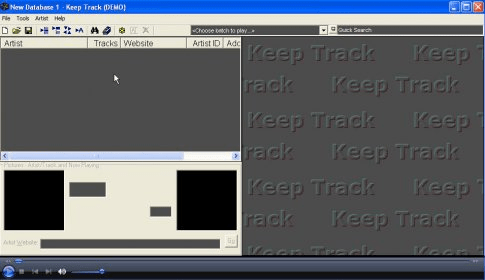
Keep Track is an easy to use music organiser and player. With it you can sort your music (MP3 and WMA files) into Artist and Track lists. When you click on an Artist, the Tracks performed by that Artist will appear in the Track list.
Tracks can be grouped together in 'batches' allowing you to keep Tracks that you like together so they can be played as a playlist or exported to an M3U playlist.
 
The following full-length review applies to version 2.1

Keep Track is a very handy utility for those one of us who have problems maintaining money transactions from various accounts. The program has a very simple user interface to increase productivity.

We can record all our transactions with all the payment details, and Keep Track will maintain a database of them. First, we need to enter all the transaction details - from the amount to category specification - and then we can select the transaction type from the many options available like withdraw, deposit, debit, check, payment etc., and confirm our transaction to save it in the database.

For our convenience, there are some preconfigured transaction types provided as One-Touch buttons. It makes the process of recording a bit faster for some of the most used transactions like using a Credit/Debit Card or performing deposits and withdrawals, etc. We can also configure our own One-Touch transaction buttons for the operations we perform frequently, so there's no need to depend on preconfigured One-Touch buttons. We can also set a password to protect our accounts and transactions from being viewed by others, but it would be better if it provided an option to encrypt our personal details for better safety. There is a sum tool that allows us to calculate the total outstanding balance on each account with a single click. In general, Keep Track is really a tool that can help us maintain our daily transaction records in an easier way.
Advantages
  • Creates and maintains a database of all transactions.
  • Configurable one-touch transaction buttons.
  • Comprehensive transaction list with a search feature.
  • Password protection.
Disadvantages
  • Limited number of one-touch buttons.
  • No encryption/decryption for better security.

Reviewed by: Manoj Goel

Reviewer rating: Editor's rating 4

Screenshots

Main Window Main Window One Touch Button Configuration One Touch Button... Options Window Options Window

Latest comments


There are no comments, be the first one!
Add new comment
Tag cloud
Download siClient

Email Address:

Password:

Register now »

Forgot password?

Copyright © 2009, Informer Technologies, Inc. About| Privacy and terms| Help| Feedback